
Interactive Projection Games: Key Factors for an Optimal Experience
What separates a good interactive game from a great one? The answer lies in the seamless harmony of hardware, software, and environment.
Interactive projection games are transforming entertainment, education, and marketing. They create magical experiences where users’ movements directly control projected visuals on walls or floors. However, the quality of this experience is not automatic. It depends on a careful balance of several technical and environmental factors. Understanding these elements is key to designing a truly immersive and responsive system.
What Are Interactive Projection Games?
Interactive projection games turn any surface into a dynamic, playable interface. Users interact with the game not through a traditional controller, but by moving their bodies within a projected space.
The system tracks their actions, and the visuals respond instantly. This creates a compelling sense of direct manipulation, making games feel more physical and engaging. From educational puzzles in museums to active fitness challenges in lobbies, this technology offers versatile applications.
How Do Interactive Projection Games Work?
The magic happens through a continuous, real-time loop involving three core stages: sensing, processing, and projecting.
First, the system senses the player. Sensors, like infrared cameras or depth-sensing devices, constantly scan the interaction zone. They detect the player’s position, gestures, and specific actions, such as a step or a hand wave.
Next, software processes this data. A central computer runs specialized interactive software. This software analyzes the sensor input, interprets the player’s intent, and calculates the appropriate visual response.
Finally, projectors deliver the response. High-quality projectors display updated graphics onto the surface. The result is an immediate visual change that corresponds to the player’s movement, closing the interaction loop in milliseconds.
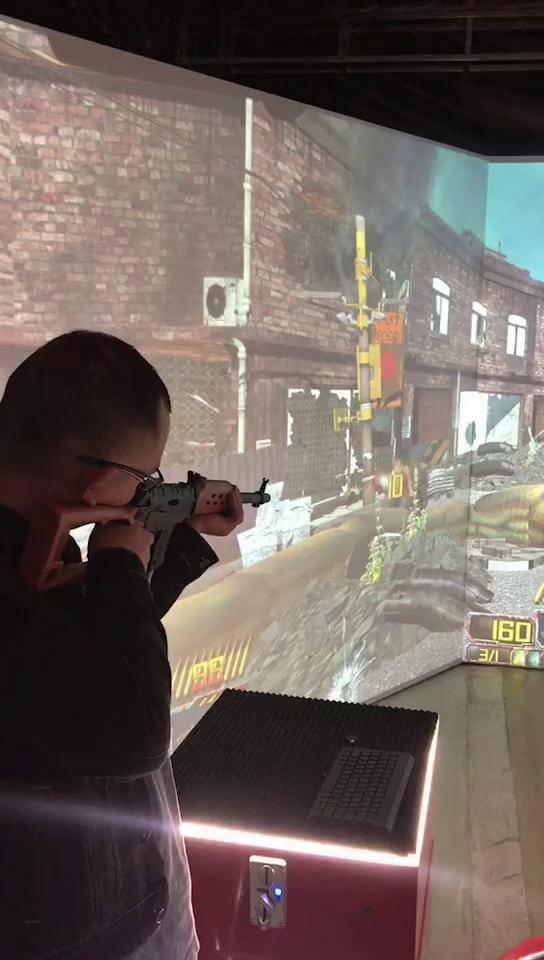
Core Components of the System
A reliable interactive projection system rests on four fundamental pillars:
- Sensing Hardware: Infrared sensors, depth cameras (e.g., Microsoft Kinect), or laser scanners that capture user motion.
- Processing Unit: A powerful computer with robust interactive software to analyze data and generate commands in real-time.
- Projection Hardware: One or more projectors with sufficient brightness and resolution to create clear, vibrant images.
- Projection Surface: The wall, floor, or screen where the interactive visuals come to life.
Key Factors Influencing User Experience
A flawless experience depends on optimizing several interconnected factors. The table below outlines common challenges and their solutions.
| Influencing Factor | Impact on Experience | Common Challenge | Optimization Recommendation |
|---|---|---|---|
| Projector & Display | Clarity, Brightness, Immersion | Washed-out images in bright rooms; blurry edges. | Use high-lumen laser projectors (5,000+ ANSI lumens for ambient light). Ensure proper resolution and lens calibration for sharp edge-blending. |
| Environmental Light | Image Visibility & Contrast | Ambient light “washing out” projected colors, ruining immersion. | Control ambient light with curtains or dimmers. Design for controlled lighting environments and use projectors with high contrast ratios. |
| Content Richness | Engagement & Replay Value | Repetitive or simplistic visuals that fail to hold interest. | Invest in high-quality, dynamic graphics and varied gameplay. Regularly update content libraries to offer new challenges and themes. |
| Projection Surface | Image Quality & Color Accuracy | Uneven colors and distorted visuals on textured or colored walls. | Use a neutral, smooth, and matte white surface. For permanent setups, install a high-gain projection screen or vinyl. |
| Sensor Performance | Responsiveness & Accuracy | Laggy response or failure to detect precise movements. | Choose high-frame-rate sensors (e.g., 60fps+). Ensure proper sensor positioning and calibration to cover the entire interaction zone without blind spots. |
| Software & Recognition | Precision & Frustration Level | Misinterpreting actions (e.g., a jump registered as a step). | Utilize advanced computer vision algorithms. Extensively test and calibrate for different user heights and movement speeds. |
Actionable Recommendations for a Superior Setup
Based on the analysis above, here is a concise guide to optimizing your system:
- Prioritize Brightness and Surface: Always choose a projector brighter than you think you need. Pair it with a dedicated, neutral projection surface. This is the most effective way to guarantee image quality.
- Control Your Environment: Treat lighting control as a mandatory part of the design, not an afterthought. A slightly darker room with a brilliant image is far more immersive than a bright room with a faded one.
- Invest in Core Technology: Do not compromise on sensor quality and software stability. A responsive, accurate system feels magical, while a laggy one feels broken. Seek providers with proven, reliable tracking technology.
- Plan for Content Evolution: Factor in the cost and plan for ongoing content updates. Fresh games and scenes are crucial for maintaining long-term user engagement and repeat visits.

Frequently Asked Questions
Q: What is the minimum space required for an interactive projection game?
A: It varies by game type, but a clear area of at least 3m x 3m (10ft x 10ft) is a common starting point. This allows for safe movement and proper sensor coverage.
Q: Can we use our existing wall, or do we need a special screen?
A: While a smooth, light-colored wall can work, a dedicated matte white projection surface (paint, vinyl, or screen) will dramatically improve image brightness, color accuracy, and overall quality.
Q: How is the system maintained?
A: Maintenance is generally straightforward. It involves regularly cleaning projector filters and sensor lenses from dust, checking for software updates, and periodically recalibrating the system to ensure alignment remains perfect.
Q: Can we create custom games for our specific brand or event?
A: Absolutely. Professional providers offer custom content development. You can tailor games with your branding, specific themes, educational goals, or unique interaction rules.
Q: Is professional installation necessary?
A: For commercial or permanent setups, yes. Professional installation ensures optimal placement of all hardware, precise calibration of sensors and projectors, and seamless software configuration for a reliable, high-performance experience.
Leave a Reply